Global Settings Overview
Global Settings controls site-wide HelpGent behavior such as dashboard pages, guest cleanup, attachment cleanup, unverified response retention, email limits, integrations, Live Chat, HelpGent AI, and licensing. Open Global…
Global Settings controls site-wide HelpGent behavior such as dashboard pages, guest cleanup, attachment cleanup, unverified response retention, email limits, integrations, Live Chat, HelpGent AI, and licensing.
Open Global Settings
- In WordPress, go to HelpGent → Global Settings.
- Use the settings navigation to open General, Integration, HelpGent AI, Live Chat, or License Key.
- Change the setting you need and select Save Settings.
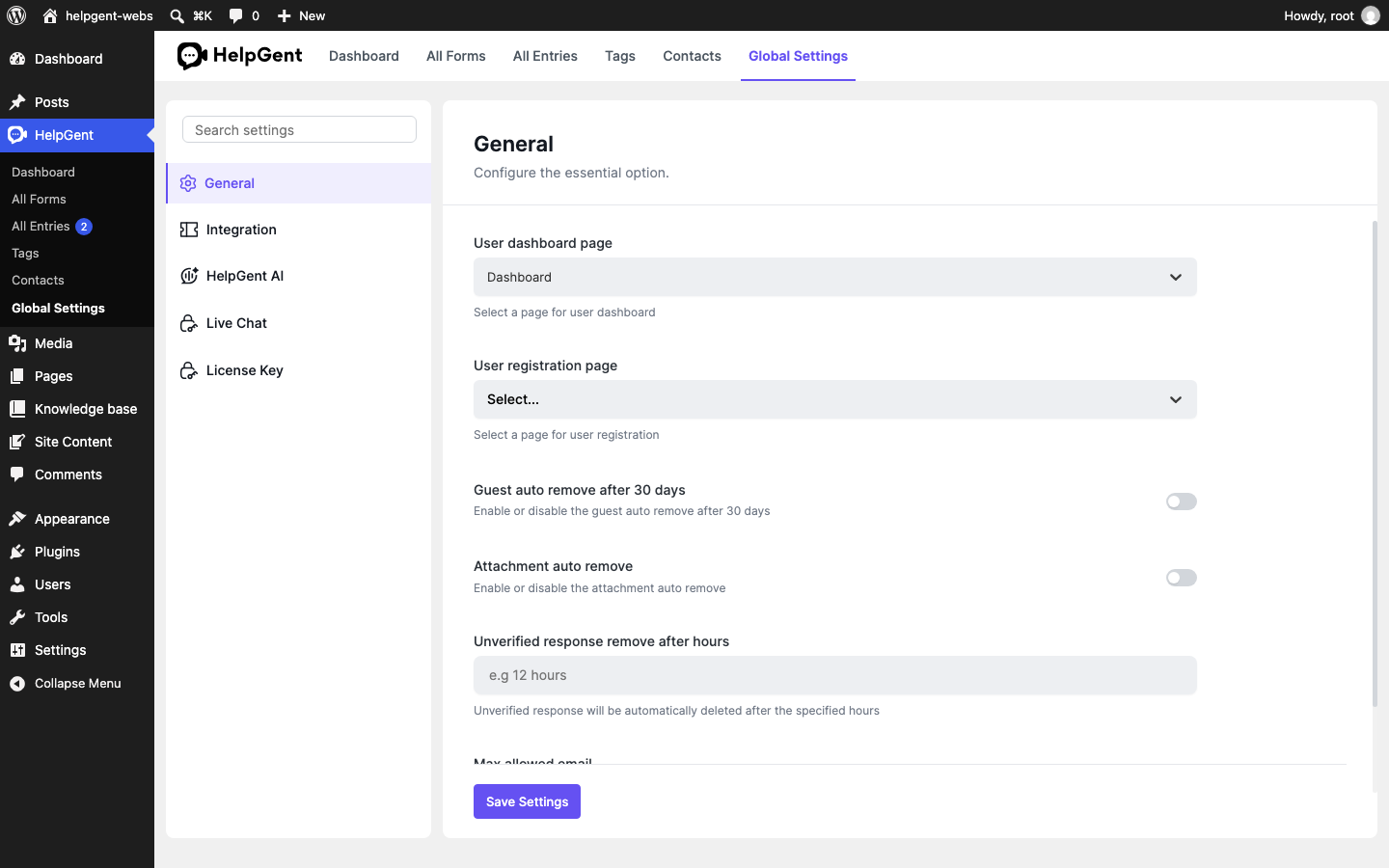
General settings
- User dashboard page: choose the WordPress page used for the visitor dashboard.
- User registration page: choose the page used for registration when your workflow uses registered users.
- Guest auto remove after 30 days: control automatic guest cleanup.
- Attachment auto remove: control automatic attachment cleanup and its number of days.
- Unverified response remove after hours: choose when unverified responses are removed.
- Max allowed email: set an email limit for the site, or leave it blank/zero for unlimited emails.
Verify the result
- The selected page and switches remain set after reload.
- The settings match your site’s privacy and retention policy.
- Integration and account status are visible from their own settings panels.